Blog API
The Inkie Blog API has two complementary surfaces. Pick the one that matches what you're trying to do — they share the same auth (API key) but have different shapes optimised for different jobs.
You want to programmatically create blogs in Inkie — push complete drafts in, or have Inkie's AI generate them from a topic.
You want to pull your Inkie blogs into your own site, RSS reader, or headless CMS — list, paginate, fetch with auto-generated SEO schema.
Base URL: https://app.inkie.ink
Create & manage
This section is for integrators driving Inkie programmatically — generating content, scheduling, polling progress.
/api/blogs/createCreate a blog post from complete data. Title and body are required. Returns immediately with SCHEDULED status.
{
  "platforms": ["wix"],          // Required. Blog platforms to publish to.
  "scheduledDate": "2025-10-20T10:00:00",  // Required. ISO datetime, local time (no tz suffix).
  "title": "5 tips for better content",    // Required.
  "body": "<p>Your full HTML body...</p>", // Required.
  "metaDescription": "Optional SEO description",
  "clientId": 123,               // Optional. Defaults to your account's active client.
  "contentPlanId": 456           // Optional. Associate with a content plan.
}{
"status": "SCHEDULED",
"blogId": 789,
"planId": 456
}/api/blogs/generateGenerate a blog post with AI. Provide a topic — Inkie writes the full article including title, body, and meta description. Returns 202; poll statusUrl for progress.
{
  "platforms": ["wix"],
  "scheduledDate": "2025-10-21T10:00:00",
  "topic": "How to repurpose video content for social media",
  "clientId": 123,
  "contentPlanId": 456
}{
"status": "PROCESSING",
"blogId": 790,
"planId": 456,
"statusUrl": "/api/blogs/790/status"
}/api/blogs/{id}/statusPoll generation status for a blog created with generate. Poll only while state is PROCESSING. Stop for every other state and follow the caller action in the status reference below.
Path param: id: the blogId returned from create or generate.
{
  "state": "NEEDS_ATTENTION",  // PROCESSING | SCHEDULED | PUBLISHED | FAILED | PARTIALLY_PUBLISHED | NEEDS_ATTENTION | AWAITING_APPROVAL
  "hint": "Choose an image for this post, for example with attach_image_asset",
  "progress": 0.85,
  "steps": [
    { "name": "content_generation", "state": "DONE" },
    { "name": "image_generation", "state": "ACTION_REQUIRED" },
    { "name": "seo_optimization", "state": "PENDING" },
    { "name": "scheduled", "state": "PENDING" }
  ]
}state: derived generation and publishing state. Manual actions and failures take precedence over approval.hint: optional guidance. It is always present forAWAITING_APPROVALand is present forNEEDS_ATTENTIONonly when the known blocker is a manual image choice.progress: generation progress from 0 to 1.steps: generation steps and their states.
/api/blogs/{id}Get full blog details: title, body, meta description and scheduled date in your client timezone.
Path param: id: the blogId.
{
  "id": 790,
  "title": "How to repurpose video content",
  "body": "<p>Full HTML blog body...</p>",
  "metaDescription": "Learn how to repurpose...",
  "scheduledDate": "2025-10-21T10:00:00",
  "textGenerationStatus": "completed",
  "imageGenerationStatus": "completed",
  "publishStatus": "scheduled",
  "platforms": ["wix"]
}
Status fields
The polling endpoint's uppercase state is the field to drive control flow. It combines text generation, image generation and publishing status into one value.
state | Meaning | Caller action |
|---|---|---|
PROCESSING | Text or image generation is still pending or running. | Keep polling every 3 to 5 seconds. |
SCHEDULED | Generation is complete and the blog is ready for its scheduled publishing flow. | Stop polling. No action is normally needed. |
PUBLISHED | Publishing completed successfully. | Stop polling and treat the blog as complete. |
FAILED | Generation or publishing failed. | Stop polling, surface the failure and retry or inspect it in Inkie. |
PARTIALLY_PUBLISHED | At least one destination published and at least one did not. | Stop polling and inspect or retry the failed destinations. |
NEEDS_ATTENTION | A manual generation action is required, publishing is blocked or the stored statuses cannot safely promise progress. | Stop polling. Follow hint when present, otherwise inspect the blog in Inkie. |
AWAITING_APPROVAL | Text and image generation are complete, but approval is required before publishing. | Stop polling, approve the blog in Inkie, then check its status again. |
AWAITING_APPROVAL includes the hint Approve this post in Inkie before it can publish. NEEDS_ATTENTION includes image guidance only for a known manual image blocker; other attention cases can omit hint.
publishStatus
GET /api/blogs/{id} and its status endpoint expose the raw lowercase publishing lifecycle value. Use the derived polling state for control flow. In particular, approval_required does not become AWAITING_APPROVAL until text and image generation are complete.
| Value | Meaning | Caller action |
|---|---|---|
pending | Publishing has not been scheduled or started. | Check the polling state to see whether generation is still running. |
scheduled | The blog is queued for its scheduled time. | No action is normally needed. |
publishing | A publishing attempt is in progress. | Wait and check again later. |
published | Publishing completed. | Treat the blog as complete. |
failed | Publishing failed. | Inspect the error and retry or correct the blog. |
blocked | Publishing cannot continue without intervention. | Inspect and resolve the blocker in Inkie. |
partially_published | Only some destinations published successfully. | Inspect or retry the failed destinations. |
approval_required | The blog must be approved before it can publish. | Finish any generation action first, then approve it in Inkie. |
deleted | The blog was soft-deleted. | Restore it before attempting further work. |
archived | The blog is archived and outside the active plan. | No action unless it should be restored to an active workflow. |
The status endpoint also returns a boolean awaitingApproval. true means publishStatus is approval_required, even while generation is processing, needs attention or has failed. Finish generation and resolve required actions or failures, then approve the blog in Inkie. false means there is no current approval gate; still follow the derived state. This boolean does not mean generation is complete.
GET /api/content-plans/:month and MCP get_content_plan use the same lowercase derived item states. pending means generation is pending or selecting, with neither text nor image actively generating; generating means generation is active. Use the matching status endpoint to poll either state. scheduled means generation is complete and its scheduled date is upcoming or missing, so no action is normally needed. overdue means the scheduled date has passed without publication: inspect the publishing setup and reschedule or publish it.
awaiting_approval means generation is complete: approve the item in Inkie. needs_attention covers manual actions, blocked publishing, partial publication or inactive unknown statuses: inspect and resolve the required action. published needs no further action. failed requires inspection and a retry or correction. These map to the shared status derivation, with failure and manual actions taking precedence over approval. summary.awaitingApproval is a number, not a boolean: it equals the number of awaiting_approval items. Review and approve those items before expecting them to publish.
Hand this to your AI builder
Wiring up a workflow that pushes content INTO Inkie — from your CMS, a Notion sync, a podcast-summariser cron, a Slack /post command? Paste the prompt below into Cursor, Bolt, Lovable, or whichever AI builder you're using.
Replace YOUR_API_KEY with your actual key from Settings → API keys.
I want to push content into my Inkie blog programmatically. My system has the content (titles, body, scheduled dates); Inkie owns the publishing pipeline. Here's everything you need:

## API

Base URL: https://app.inkie.ink

Auth: Bearer token in the Authorization header.
  Authorization: Bearer YOUR_API_KEY

### Option 1 — Create a blog from complete content I already have
POST /api/blogs/create
  Body: {
    platforms: ["wix"],                       // required, see /api/platforms for the list of yours
    scheduledDate: "2025-10-20T10:00:00",     // required, ISO datetime, LOCAL time (no tz suffix)
    title: "...",                             // required
    body: "<p>Full HTML body...</p>",         // required
    metaDescription: "Optional SEO description",
    clientId: 123,                            // optional, defaults to my account's active client
    contentPlanId: 456                        // optional, associate with a content plan
  }
  Response 200: { status: "SCHEDULED", blogId, planId }

### Option 2 — Have Inkie's AI generate the blog from a topic (async)
POST /api/blogs/generate
  Body: {
    platforms: ["wix"],
    scheduledDate: "2025-10-21T10:00:00",
    topic: "...",                             // required, the brief
    clientId: 123,
    contentPlanId: 456
  }
  Response 202: { status: "PROCESSING", blogId, planId, statusUrl: "/api/blogs/{blogId}/status" }

### Poll generation status (only needed after generate)
GET /api/blogs/{blogId}/status
  Response 200: {
    state: "PROCESSING" | "SCHEDULED" | "PUBLISHED" | "FAILED" | "PARTIALLY_PUBLISHED" | "NEEDS_ATTENTION" | "AWAITING_APPROVAL",
    hint?: string, // Only for NEEDS_ATTENTION or AWAITING_APPROVAL.
    progress: 0–1,
    steps: [{ name, state }, ...]
  }
  Poll every 3–5 seconds only while state === "PROCESSING".
  NEEDS_ATTENTION takes precedence over approval. It includes an image hint only when manual image selection is the known blocker.
  AWAITING_APPROVAL means generation is complete and includes hint: "Approve this post in Inkie before it can publish".
  All other states omit hint. get_content_plan maps these to needs_attention and awaiting_approval.

### Retrieve a blog after creation
GET /api/blogs/{blogId}
  Response 200: { id, title, body, metaDescription, scheduledDate, publishStatus, platforms }

### Error shape
{ error: "..." }   // any non-2xx

## What I want you to build

1. A small helper module `inkie-blog-client.ts` (or equivalent for my language) exposing two functions:
   - `createBlog(input)` — wraps POST /api/blogs/create
   - `generateBlog(input)` — wraps POST /api/blogs/generate AND polls /status only while PROCESSING, surfaces FAILED or NEEDS_ATTENTION, and fetches the blog via GET /api/blogs/{id} when SCHEDULED, PUBLISHED or AWAITING_APPROVAL (preserving its approval requirement)

2. Both functions should:
   - Throw / return Result with the API's error message on non-2xx
   - Be small, dependency-free (use native fetch)
   - Read API key + base URL from environment variables (INKIE_API_KEY, INKIE_BASE_URL — default https://app.inkie.ink)

3. A worked example showing how to call `createBlog` from my existing content pipeline. Ask me where my content currently lives (CMS / Notion / Markdown files / etc.) so the example slots into MY shape, not a generic one.

## Critical details (Inkie-specific gotchas)

- `scheduledDate` is local time, NOT UTC. Pass "2025-10-20T10:00:00" — no `Z`, no tz offset. Inkie converts to UTC internally using my client's timezone setting.
- `platforms` accepts only platforms I've connected. Call GET /api/platforms first if unsure which strings are valid for my account.
- `generate` is async: response is 202 not 200, and wait for SCHEDULED or AWAITING_APPROVAL before retrieving completed content; NEEDS_ATTENTION requires action before generation can finish.
- `body` for /create must be valid HTML. Markdown will publish as escaped HTML — convert first if your source is Markdown.

## Things to NOT do

- Don't poll /status faster than every 3 seconds — be a good citizen.
- Don't retry on 4xx errors — they're configuration mistakes, not transient.
- Don't hardcode the API key in source. Use env vars and document them in the README.

## Reference

Full docs: https://app.inkie.ink/docs/blog-api
OpenAPI spec: https://app.inkie.ink/api/openapi.json

Now ask me what language I'm working in (TypeScript / Python / Go / etc.) and where my content currently lives, then scaffold the helper module and worked example.
Read & render
This section is for integrators rendering Inkie blogs on their own surface — headless CMS, static-site builds, RSS feeds, mobile app screens. By default only published blogs are returned, but you can opt-in to unpublished/scheduled-future posts via ?published=false — useful for staging previews where you want to render upcoming content before it goes live.
Returns include schema.org/BlogPosting JSON-LD per blog (auto-generated from your client's profile) so you can drop it straight into an article page's <head> for SEO.
Don't want to build a feed from the endpoints below? Every client has a public RSS 2.0 feed of their published blogs at:
https://app.inkie.ink/feeds/<your-client-slug>/rss.xml
- Full article in
content:encoded(not just the excerpt), so a reader shows the whole post even without a per-post link. - Each item links to your configured blog URL when you've set one, and omits the link otherwise, never a guessed or broken per-post URL.
- Published posts only. Public, cacheable, no authentication.
Find your feed URL on the Other Blog Platforms page (Connect Blogs → Other), under Your public RSS feed. The DIY mapping below is still there for custom feed shapes; this is the fast path.
/api/client-blogsList blogs for your account, newest first. Cached publicly for 5 minutes.
Query params (all optional):
page— 1-indexed page number. Default1.perPage— page size, 1–100. Default100.published—true(default) returns published blogs only;falsereturns unpublished / scheduled-future drafts. Pass?published=falsefor preview / staging surfaces.search— case-insensitive substring match on title.publishedAtuses the actual publication date, falling back to the planned date for older posts. Public lists are ordered by this date before pagination.scheduledDateremains the planned date.scheduledFrom— ISO date. Only blogs scheduled on or after this.scheduledTo— ISO date. Only blogs scheduled on or before this.
{
  "success": true,
  "data": [
    {
      "id": 790,
      "title": "How to repurpose video content",
      "slug": "how-to-repurpose-video-content",
      "metaDescription": "Learn how to repurpose...",
      "publishedAt": "2025-10-21T10:00:00.000Z",
      "scheduledDate": "2025-10-21T10:00:00.000Z",
      "status": "PUBLISHED",
      "excerpt": "Three ways to turn one recording into a week of content...",
      "mainImage": {
        "id": 42,
        "url": "https://...",
        "alt": "Recording setup",
        "title": null
      },
      "readingTime": 4
    }
  ],
  "count": 1,
  "page": 1,
  "perPage": 100
}/api/client-blogs/{blogId}Get a single published blog with full body, all images, and pre-built JSON-LD. Cached publicly for 10 minutes.
Path param: blogId — numeric blog id from the list endpoint.
{
  "success": true,
  "data": {
    "id": 790,
    "title": "How to repurpose video content",
    "slug": "how-to-repurpose-video-content",
    "metaDescription": "Learn how to repurpose...",
    "pageTitle": "How to repurpose video content | Inkie",
    "body": "<p>Full HTML blog body...</p>",
    "publishedAt": "2025-10-21T10:00:00.000Z",
    "scheduledDate": "2025-10-21T10:00:00.000Z",
    "status": "PUBLISHED",
    "readingTime": 4,
    "wordCount": 850,
    "additionalImages": [ ... ],
    "structuredData": {
      "@context": "https://schema.org",
      "@type": "BlogPosting",
      "headline": "How to repurpose video content",
      "description": "Learn how to repurpose...",
      "image": ["https://..."],
      "datePublished": "2025-10-21T10:00:00.000Z",
      "dateModified": "2025-10-21T10:00:00.000Z",
      "author": { "@type": "Organization", "name": "Your client name" },
      "publisher": { "@type": "Organization", "name": "Your client name" },
      "mainEntityOfPage": { "@type": "WebPage", "@id": "https://..." },
      "wordCount": 850
    }
  }
}
Use cases
- Headless CMS: fetch list at build time, render each post on your site's templates. Cache headers cooperate with Next.js / Astro ISR.
- RSS / Atom feed: map the list response straight to feed items, or skip the work and use the ready-made RSS feed above.
- Article SEO: drop
structuredDatainto<script type="application/ld+json">in your article<head>. - Mobile app: paginate via
page/perPage; cache the list locally between visits.
Add your blog URL (so your social posts link to it)
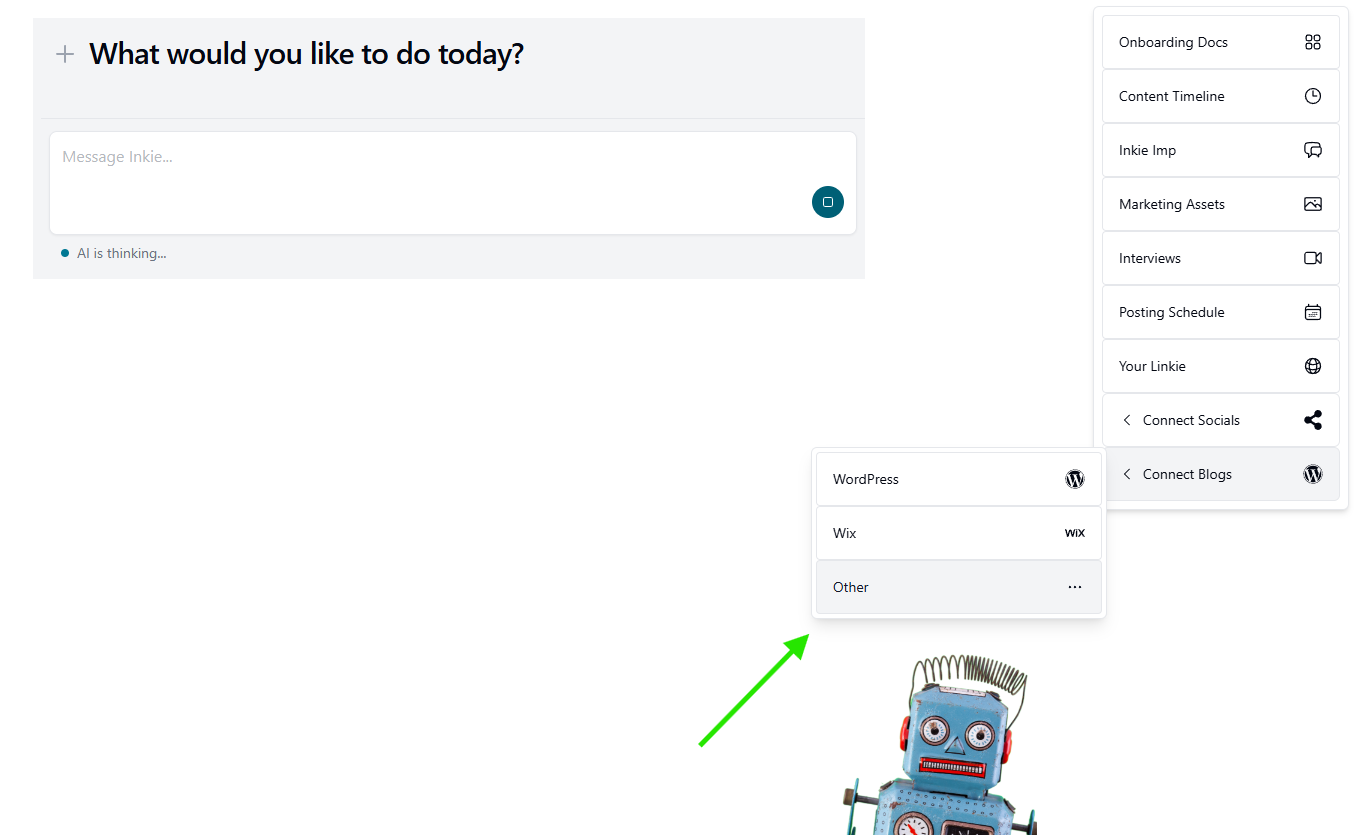
When Inkie publishes social posts about your blog, it links them back using your blog's root URL. To set it:
- From the main menu, open Connect Blogs and choose Other.
- On the Other Blog Platforms page, under Your Blog URL, enter your blog's root URL (e.g.
https://yourblog.com) and Save.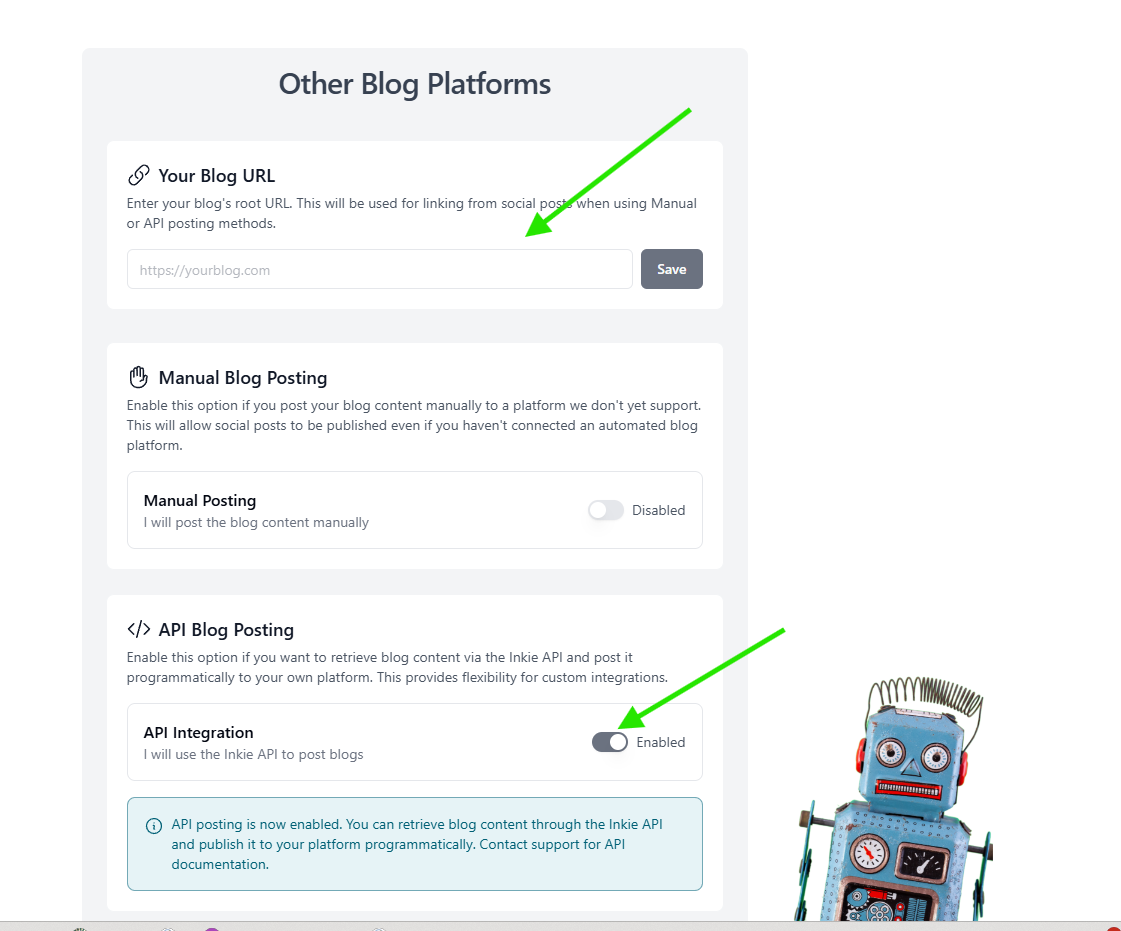
This URL is used for linking from your social posts, whether you post manually or via the API.
Hand this to your AI site-builder
Using Cursor, v0, Bolt, Lovable, or another AI builder to scaffold your site? Copy the prompt below into the chat — it gives the AI everything it needs to wire up your Inkie blog as a headless CMS feed: list page, article page, JSON-LD SEO, the lot.
Replace YOUR_API_KEY with your actual key from Settings → API keys. The prompt assumes a modern React/Remix/Next/Astro frontend; tweak the framework section if you're using something else.
I want to integrate my Inkie blog into this site as a headless CMS feed. Inkie publishes my blog posts; my site fetches and renders them. Here's everything you need:

## API

Base URL: https://app.inkie.ink

Auth: Bearer token in the Authorization header.
  Authorization: Bearer YOUR_API_KEY

### List blogs
GET /api/client-blogs?page=1&perPage=20
  Optional query params:
    published (default true; pass false for unpublished/scheduled drafts — preview/staging only)
    search (substring match on title)
    scheduledFrom, scheduledTo (ISO dates)
  Response: { success: true, data: BlogSummary[], count, page, perPage }
  BlogSummary: { id, title, slug, metaDescription, publishedAt, scheduledDate,
                 status, excerpt, mainImage?: { id, url, alt, title },
                 readingTime }
  Cache: public, max-age=300 (5 min). Sort: newest first.

### Get a single published blog
GET /api/client-blogs/{blogId}
  Response: { success: true, data: BlogDetail }
  BlogDetail includes: title, slug, body (HTML string), pageTitle,
    metaDescription, publishedAt, scheduledDate, additionalImages[],
    structuredData (a ready-made schema.org/BlogPosting JSON-LD object),
    readingTime, wordCount.
  Cache: public, max-age=600 (10 min).

### Error shape
{ success: false, error: "..." }   // any non-2xx

## What I want you to build

1. A blog index page at /blog that:
   - Fetches GET /api/client-blogs?perPage=20 (server-side / at build time)
   - Renders a card grid with title, excerpt, mainImage.url, readingTime, publishedAt
   - Links each card to /blog/{slug}

2. A blog detail page at /blog/{slug} that:
   - Fetches GET /api/client-blogs/{id} (resolve slug → id via the list, or pass id in URL — whichever your router prefers)
   - Renders the body HTML directly (it's safe — sanitised on Inkie's side)
   - Adds the entire structuredData object into the page's <head> as:
       <script type="application/ld+json">{JSON.stringify(structuredData)}</script>
   - Sets pageTitle as the <title>, metaDescription as <meta name="description">
   - Optionally renders additionalImages somewhere in the layout

3. Style it to match the rest of the site. Use the site's existing typography + card components.

4. Where caching matters (Next.js ISR, Astro static fetch, Remix loader cache), respect Inkie's Cache-Control headers — don't fetch on every request.

## Things to NOT do

- Don't fetch on every page load — use ISR / static / loader-cache with a 5-10 min TTL
- Don't try to write through this API — it's read-only. Inkie creates blogs; you render them.
- Don't strip the structuredData — it's the SEO win, drop it into <head> exactly as returned.

## Reference

Full docs: https://app.inkie.ink/docs/blog-api
OpenAPI spec: https://app.inkie.ink/api/client-blogs/openapi.json

Now ask me which framework I'm using (Next.js, Astro, Remix, Nuxt, SvelteKit, plain HTML, etc.) and what URL my site lives on, then scaffold the two pages above.
Platforms
The platforms field accepts any combination of your connected blog platforms. To see which platforms are active on your account:
GET /api/platforms
Authorization: Bearer YOUR_API_KEY
Returns blog and social platforms: all is every platform you have connected, enabled is the ones currently switched on.
Scheduled dates
Pass scheduledDate as an ISO datetime string without a timezone suffix — e.g. 2025-10-20T10:00:00. Inkie interprets it as your client's local time and converts to UTC internally.
Polling pattern
Endpoints that generate AI content return 202 with a statusUrl. Poll that URL every 3–5 seconds only while state === "PROCESSING". Stop for manual actions (NEEDS_ATTENTION) or approval (AWAITING_APPROVAL); completed generation can still require approval before publishing.
// Pseudocode
const { blogId, statusUrl } = await fetch('/api/blogs/generate', { ... }).json();

let status;
do {
  await sleep(3000);
  status = await fetch(statusUrl).json();
} while (status.state === 'PROCESSING');

if (status.state === 'FAILED' || status.state === 'NEEDS_ATTENTION') {
  throw new Error(status.state); // Surface manual actions instead of polling forever.
}
// AWAITING_APPROVAL content is ready to review, and still requires approval.
const blog = await fetch(`/api/blogs/${blogId}`).json();
Error codes
| Status | Meaning |
|---|---|
400 | Validation error — check request body. |
401 | Missing or invalid API key. See Authentication. |
403 | Access denied — resource doesn't belong to your account. |
404 | Blog not found. |
See also
- Interactive OpenAPI spec — try requests directly in the browser
- MCP integration — use the blog API from an AI agent